
Download AI Interview Copilot – Real‑time Interview Assistant & Coding Helper
Overview
AI Interview Copilot is a web‑based interview companion designed for developers, data scientists, and anyone facing technical interview challenges. Built on the latest large‑language‑model architecture, the platform can understand complex algorithmic prompts, generate clean code snippets, and explain solutions step‑by‑step—all while you speak or type. What makes it stand out is its multimodal capability: you can upload images of whiteboard sketches, paste screenshots of error logs, or simply dictate a problem in any of over 30 supported languages. The AI instantly transcribes spoken dialogue, turning it into searchable text that can be exported after the session. This eliminates the need for manual note‑taking and ensures that non‑native English speakers receive the same level of assistance as native speakers.
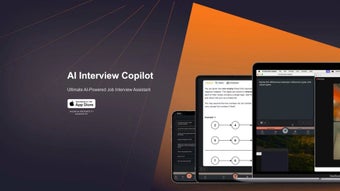
The interface is intentionally minimalistic. A central prompt window occupies the majority of the screen, while a side panel delivers live feedback, test‑case results, and performance hints. Quick‑access buttons let you switch between text, voice, and image input without interrupting the interview flow. Security is baked in from day one: all communications are encrypted with TLS 1.3, and the service does not retain any personally identifiable information unless you explicitly enable session saving. Automatic updates guarantee that you always interact with the newest AI model and feature set, so you never fall behind on the latest coding standards or interview techniques.
Whether you’re preparing for a senior engineering role at a large tech company or a junior data‑science position at a fast‑growing startup, AI Interview Copilot levels the playing field. It offers the same instant, high‑quality assistance that senior developers rely on in their daily workflows, helping you stay focused, confident, and ready to showcase your true abilities during every interview.
Key Features
The power of AI Interview Copilot lies in a carefully curated set of capabilities that address every stage of a technical interview. Below is an expanded look at each feature, explaining how it adds real value to candidates.
- Real‑time code generation: Supports Python, JavaScript, Java, C++, Go, and more. The AI writes syntactically correct snippets, runs basic tests, and suggests optimizations on the fly.
- Algorithmic breakdown: Complex problems are split into digestible steps, with hints, sample inputs, and edge‑case considerations to guide you toward an optimal solution.
- Multilingual voice transcription: Over 30 languages are recognized via the browser’s Web Speech API, turning spoken answers into searchable text instantly.
- Image & screenshot analysis: Upload a photo of a whiteboard diagram, a code fragment, or an architecture sketch; the AI extracts text, detects code patterns, and returns explanations or refactored code.
- Cross‑device clipboard sync: Copy a snippet on your laptop and paste it on a tablet during screen‑sharing without losing context.
- Instant feedback panel: Shows correctness checks, runtime complexity estimates, and style suggestions without interrupting the interview.
- Secure TLS‑encrypted communication: Guarantees privacy; no data is stored unless you opt‑in to save a session.
- Automatic model updates: New language packs and AI improvements are deployed automatically, keeping the tool future‑proof.
- Customizable UI themes: Light and dark modes, adjustable font sizes, and high‑contrast options reduce eye strain during long sessions.
- Exportable session logs: Download a full transcript, code snippets, and AI feedback for post‑interview review or portfolio building.
Installation & Compatibility
AI Interview Copilot is delivered as a pure web application, so there is no traditional installer to download. To begin, open a modern browser—Chrome, Edge, Firefox, or Safari—on any device with an internet connection and navigate to aiinterviewcopilot.com. Register using an email address or a single‑sign‑on provider (Google, Microsoft, or Apple). After email verification, you are taken straight to the dashboard where an onboarding wizard walks you through three essential steps: selecting your primary programming language(s), granting microphone access for voice transcription, and allowing clipboard permissions for cross‑device syncing. All permissions are optional and can be changed later in the Settings menu.
Because the service runs entirely in the cloud, it works on any operating system that supports a recent web browser. This includes Windows 10/11, macOS Monterey or later, major Linux distributions, Android 8.0+ and iOS 13+. For users who prefer a native‑like experience, the platform can be installed as a Progressive Web App (PWA). Simply click “Install” in the browser’s address bar to add a shortcut to your desktop, taskbar, or home screen. The PWA caches UI assets for offline loading, but core AI processing still requires an active internet connection.
System requirements are modest: a minimum of 2 GB RAM, a dual‑core processor, and a stable broadband or 4G/5G connection with at least 5 Mbps download speed. The voice transcription feature leverages the Web Speech API, which works on most modern browsers but may prompt for microphone permission. Image recognition is performed on the server side, so even low‑end devices can upload screenshots and receive rapid feedback. Accessibility options such as high‑contrast themes, scalable fonts, and full keyboard navigation ensure that a wide range of users can benefit from the tool.
Pros, Cons, FAQ & Final Verdict
Pros:
- Instant, accurate code generation for multiple programming languages.
- Voice transcription in 30+ languages enhances accessibility.
- Image and screenshot recognition expands interview scenario coverage.
- Cross‑device clipboard sync prevents loss of context during screen sharing.
- Secure TLS‑encrypted communication protects interview confidentiality.
- Free tier with generous limits; premium plan adds unlimited sessions and advanced customization.
Cons:
- Requires a stable internet connection; offline use is limited to UI caching.
- AI suggestions can be verbose, needing user refinement.
- Advanced customization (custom prompts, priority support) is reserved for paid plans.
- Performance varies slightly between browsers; Chrome provides the smoothest experience.
Is AI Interview Copilot free to use?
Yes. The free tier includes up to 10 interview sessions per month, unlimited language support, and basic code generation. A premium subscription removes these limits and adds features such as custom AI prompts and priority support.
Which programming languages are supported?
The AI can generate code in Python, JavaScript, TypeScript, Java, C++, C#, Go, Ruby, Swift, and many more. It also understands pseudocode and can translate between languages on the fly.
How does voice transcription work on mobile devices?
When you grant microphone access, the browser’s Web Speech API captures your speech, sends it to the backend for processing, and returns a real‑time transcript. This works on iOS Safari and Android Chrome, supporting over 30 languages and dialects.
Can I upload a photo of a whiteboard diagram for the AI to interpret?
Absolutely. The image recognition engine uses OCR and computer‑vision models to extract text, shapes, and code snippets from uploaded photos. After analysis, the AI provides a textual explanation and, if relevant, a code version of the diagram.
Is my interview data stored or shared with third parties?
Data is encrypted in transit and at rest. The platform does not retain any personally identifiable information unless you explicitly enable session export. No data is sold or shared with advertisers.
Conclusion & Call to Action
AI Interview Copilot bridges the gap between preparation and performance, offering a live, intelligent partner that demystifies the toughest technical questions. Its blend of real‑time coding, multilingual transcription, and visual analysis makes it one of the most versatile interview assistants available today. Whether you’re a seasoned engineer polishing your interview technique or a recent graduate nervous about a first technical screen, the tool provides a secure, user‑friendly environment that boosts confidence and improves outcomes.
Ready to experience smoother, more successful interviews? Download AI Interview Copilot now and start your free trial. Leverage live coding assistance, voice transcription, and image‑recognition features to turn every interview into a showcase of your true abilities.



.png)



